
AdsPower vs ClonBrowser: Which Anti-Detect Browser Wins?
Nov 18, 2026
Managing hundreds of online accounts without triggering platform bans requires more than just a proxy. You need a browser that makes every profile look like a completely separate device. VMLogin promises exactly that—a virtual multi-login environment where each profile carries a unique fingerprint, isolated storage, and no cross-contamination. This review breaks down who VMLogin actually serves, where it excels, and where its limitations might push you toward an AdsPower vs Multilogin comparison or other alternatives.
VMLogin is a Windows-based anti-detect browser that replaces the need for multiple physical computers. Instead of juggling separate devices, you create virtual browser profiles—each with its own cookies, local storage, cache, and fingerprint parameters. The core promise is simple: one computer, over 200 accounts, zero linkage.
The software generates unique fingerprints per profile, manipulating Canvas, WebGL, audio stack, and font rendering so that platforms see distinct devices. Team members can share or transfer encrypted profiles, making it suitable for collaborative workflows in social media marketing, e-commerce, brand protection, ad verification, and retail price monitoring.
VMLogin fits operators who need explicit tier limits and predictable costs. The pricing structure is refreshingly transparent—four named tiers with hard profile ceilings rather than vague "unlimited" claims.
Ideal users include:
Less ideal for:
One of VMLogin's strongest selling points is pricing clarity. You know exactly how many profiles you get at each level, with no hidden upsells.
| Tier | Price | Browser Profiles | Free Sub-Accounts | REST API |
|---|---|---|---|---|
| Free | $0 (3 days) | 5 | Included | Basic |
| Solo | $99/month | 200 | 5 | Basic |
| Team | $209/month | 500 | 10 | Basic |
| Scale | $499/month | 3,000 | 20 | Advanced |
All paid tiers include a 25% discount on annual billing. The Scale tier's 3,000-profile ceiling at $499/month (or roughly $374/month annually) is competitive for fleet operators. Payment methods are unusually broad—Bitcoin, USDT, and 16+ regional options including PIX (Brazil), GCash (Philippines), SPEI (Mexico), and PayNow (Singapore).
Every saved profile renders with its own browser fingerprint. VMLogin rotates Canvas, WebGL, audio context, and font enumeration so that platforms cannot correlate accounts. This isn't just cookie separation—it's full environmental isolation. For teams, profile sharing happens through encrypted transfer between sub-accounts, maintaining fingerprint integrity across collaborators.
VMLogin integrates with Selenium WebDriver for programmatic control. Browser Automation Studio is also supported. However, Puppeteer and Playwright are not listed on the official site—a notable gap if your automation stack depends on those frameworks. The REST API tiers matter here: Basic API on Free/Solo/Team covers essential profile management, while the Advanced API on Scale unlocks fleet-level programmatic operations.
Sub-account structures let you assign member access controls. You can share or transfer browser profiles between team members without exposing credentials. This is practical for agencies where different specialists handle different account sets—one person manages Facebook ads while another runs TikTok campaigns, all from isolated profiles.
The Scale tier's 3,000-profile ceiling is among the highest single-license limits in the anti-detect category. For comparison, many competitors cap at 1,000 or require custom enterprise negotiations. The Group List and Recycle Bin features help organize large profile collections.
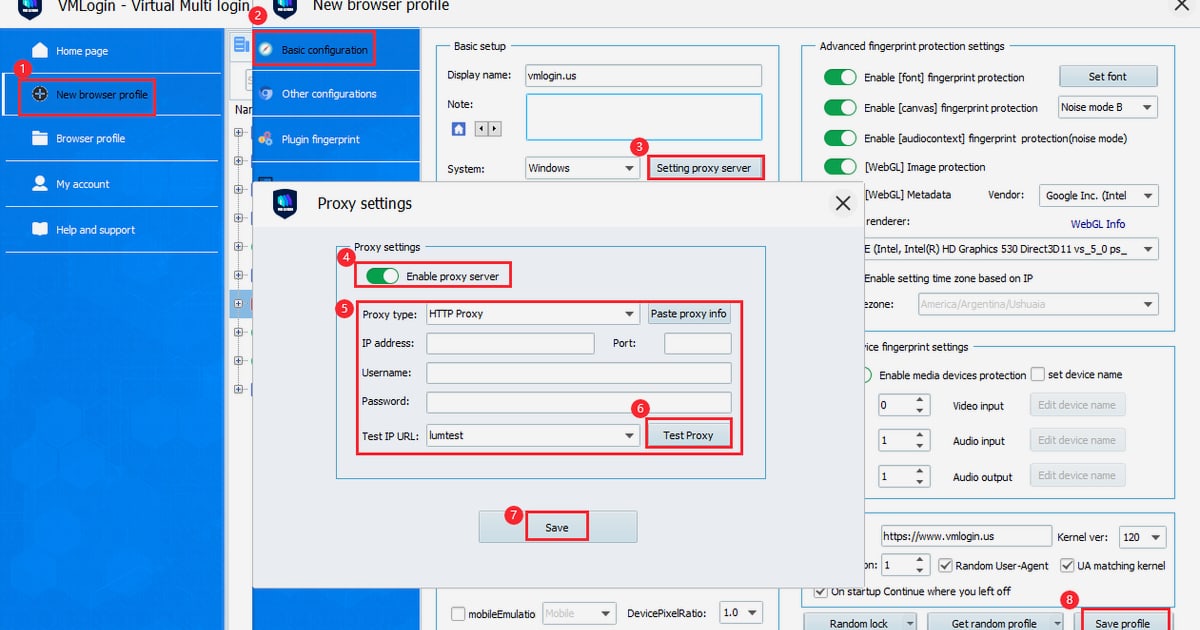
Getting started follows a straightforward path:
The interface organizes profiles into sections: Home Page for overview, Browser Profiles for management, Group List for categorization, Recycle Bin for recovery, and My Account for billing and preferences. Profile Parameters Override lets you batch-modify settings across multiple profiles—useful when rotating proxies or updating user agents fleet-wide.
Choosing an anti-detect browser depends on your operating system, automation stack, and scale requirements.
Consider VMLogin if:
Look elsewhere if:
For teams comparing options, the AdsPower vs Multilogin breakdown covers two major competitors with different strengths in automation and mobile support.
A unique browser fingerprint solves half the detection puzzle. The other half is network identity. If 200 profiles all egress from the same datacenter IP, platforms can still correlate them by ASN and IP range. VMLogin profiles need dedicated proxies—ideally residential or mobile IPs—assigned 1:1. This fingerprint-plus-IP pairing is what makes multi-accounting sustainable at scale. Without it, even the best anti-detect browser becomes a single point of failure.
VMLogin offers a 3-day free trial with 5 browser profiles and basic REST API access. After the trial, paid plans start at $99/month for the Solo tier with 200 profiles.
The public site only lists a Windows client. Mac and Linux support are not stated, so assume Windows-only unless the vendor confirms otherwise.
Puppeteer and Playwright are not listed as supported automation frameworks. VMLogin officially integrates with Selenium WebDriver and Browser Automation Studio.
Team plans include free sub-accounts (5 on Solo, 10 on Team, 20 on Scale). You can share or transfer encrypted browser profiles between sub-accounts with member access controls.
VMLogin accepts Bitcoin, USDT, and 16+ regional payment methods including PIX, GCash, SPEI, PayNow, FPX, and DOKU.
The Scale tier supports up to 3,000 browser profiles on a single license. Solo supports 200, and Team supports 500.
VMLogin earns its place among serious anti-detect browsers through pricing transparency and high profile ceilings. The four-tier structure removes guesswork—you size against real workload rather than negotiating custom deals. For Windows-based operators running Selenium automation at scale, the value proposition is clear.
The gaps are equally clear: no Mac/Linux support, no Puppeteer/Playwright integration, and no mobile anti-detection. These aren't dealbreakers for everyone, but they define the audience. VMLogin is a specialized tool for specific workflows, not a one-size-fits-all solution.
If your stack aligns—Windows, Selenium, 200–3,000 profiles, and a budget for dedicated proxies—VMLogin delivers what it promises. If not, the anti-detect market has plenty of alternatives worth exploring.


