
AdsPower vs ClonBrowser: Which Anti-Detect Browser Wins?
Nov 18, 2026
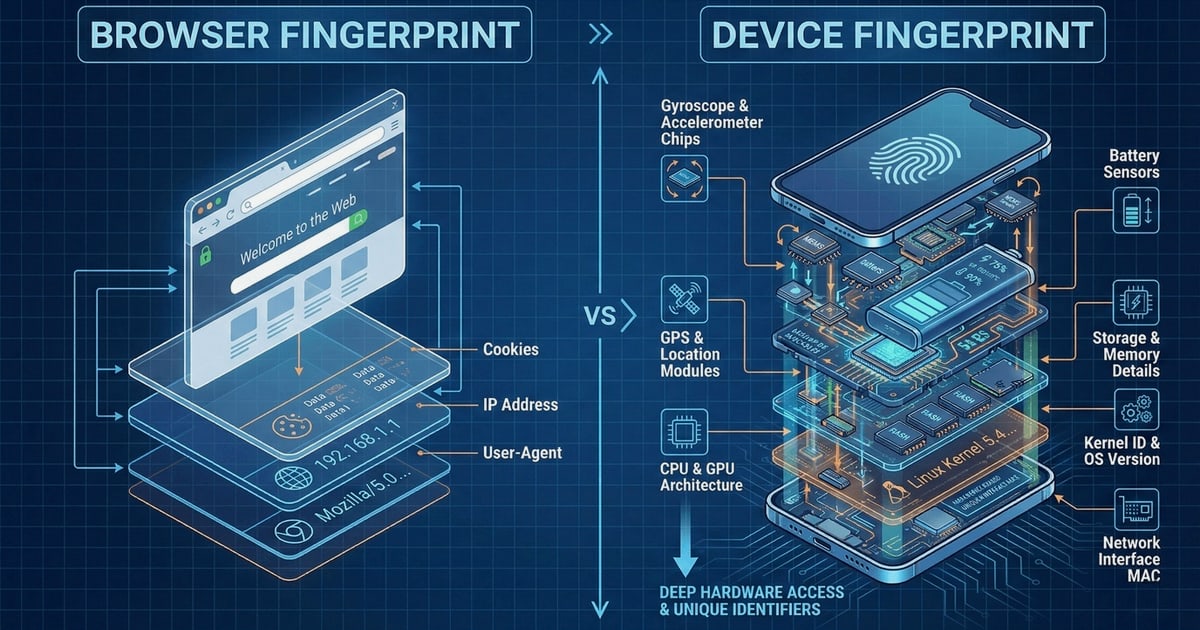
AdsPower and Fingerprint solve opposite sides of the same problem. AdsPower creates isolated, unique browser fingerprints so you can manage multiple accounts without triggering platform bans. Fingerprint identifies every visitor with industry-leading accuracy so you can stop fraud, account takeover, and bot attacks. Used together, they form a powerful loop: you build realistic browser environments with AdsPower, then verify how those environments appear to risk systems using Fingerprint's device intelligence.
This guide walks through why the combination makes sense, how to set up both tools, practical workflows, and the specific problems the pairing solves.

Fingerprint product interface.
Most people think of these tools as competitors. In reality, they address different layers of the browser identity stack.
AdsPower is an anti-detect browser for multi-account management. It simulates over 20 fingerprint parameters—Canvas, WebGL, Audio, WebRTC, timezone, language, screen resolution, fonts, and more—so each browser profile looks like a distinct real user on a distinct device. Over 9 million professionals use it for cross-border e-commerce, social media marketing, affiliate campaigns, web scraping, and crypto account management.
Fingerprint is a device intelligence platform for developers, fraud analysts, and product teams. It generates persistent visitor IDs through a JavaScript agent and mobile SDKs, then layers 20+ Smart Signals—VPN detection, browser tampering, emulator detection, and more—to assess risk. It processes 50M+ API events daily and has prevented over $1B in fraud losses annually.
Here is the key insight: Fingerprint is designed to detect exactly the kind of fingerprint manipulation that AdsPower performs. That makes Fingerprint an excellent quality-assurance tool for AdsPower users. If your AdsPower profile passes Fingerprint's checks, it will likely pass the risk systems on Amazon, Facebook, TikTok, Google, and LinkedIn.
The combined workflow has three phases:
This loop is especially valuable for teams that manage hundreds or thousands of accounts. A single fingerprint inconsistency can link accounts and trigger mass bans. Fingerprint gives you an independent audit layer before you scale.
Start by creating a profile in the AdsPower dashboard. The goal is a fingerprint that is internally consistent: every parameter should match the same fictional user, device, and location.
When you create a new profile, AdsPower asks you to define the browser identity. Pay attention to these parameters:
Every AdsPower profile should have its own residential or mobile proxy. The proxy IP determines the profile's apparent location, and all fingerprint parameters should align with that location. A profile with a US proxy but a European timezone is an immediate red flag.
Before deploying dozens of profiles, create one test profile and run it through a fingerprint checker. AdsPower's own documentation recommends verifying parameters like WebRTC, timezone, and Canvas to ensure no leaks.
Fingerprint product interface.
Fingerprint's JavaScript agent runs on any website you control. To use it as a verification layer for AdsPower profiles, you need a simple test page that loads the Fingerprint agent and displays the results.
<script>
  const fpPromise = import('https://fpjscdn.net/v3/YOUR_PUBLIC_API_KEY')
    .then(FingerprintJS => FingerprintJS.load())

  fpPromise
    .then(fp => fp.get())
    .then(result => {
      console.log(result.visitorId)
      console.log(result.incognito)
      console.log(result.browserName)
      console.log(result.os)
      console.log(result.device)
    })
</script>
When you visit the test page from an AdsPower profile, compare the Fingerprint results against the profile's intended identity:
Fingerprint product interface.
Fingerprint's 20+ Smart Signals go beyond basic identification. For AdsPower users, the most relevant signals are:
Use these signals as a pre-flight check. If a profile consistently triggers high-risk signals, adjust its AdsPower configuration before using it on target platforms.
Imagine you run a cross-border e-commerce operation with 50 Amazon seller accounts. Each account needs a distinct identity to avoid linking.
Without Fingerprint: You create 50 AdsPower profiles, assign 50 residential proxies, and start selling. Three weeks later, Amazon links 12 accounts and suspends them. You have no idea which fingerprint parameter caused the linking.
With Fingerprint: You create the same 50 AdsPower profiles, but first run each one through your Fingerprint test page. You discover that 8 profiles share the same Canvas hash because you forgot to enable hardware noise. You fix those profiles, re-test, and deploy. Account survival rate improves dramatically.
Affiliate marketers often need to verify that their landing pages render correctly for different visitor types. With AdsPower, you can simulate visitors from different countries, devices, and browsers. With Fingerprint on your landing page, you can confirm that each simulated visitor receives a unique, stable visitor ID—exactly what you would expect from real traffic.
This is also useful for ad verification: confirm that your ads are being served to the intended audience segments by checking the device intelligence of the visitors who click through.
If you work on a fraud prevention team, you need to know how your Fingerprint-based rules respond to anti-detect browsers. AdsPower gives you a controlled way to test:
This helps you understand the limits of your fraud detection without waiting for real fraudsters to test it for you.
Fingerprint product interface.
These tools are not interchangeable. Here is a quick decision guide:
| Scenario | Use AdsPower | Use Fingerprint | |---|---|---|---| | Manage multiple seller or social accounts | Yes | No | | Create isolated browser environments | Yes | No | | Automate repetitive tasks with RPA | Yes | No | | Identify visitors on your own website | No | Yes | | Detect fraud, bots, and account takeover | No | Yes | | Verify AdsPower profile quality | Yes | Yes | | Test fraud rules against anti-detect browsers | Yes | Yes |
For a deeper comparison of AdsPower against other anti-detect browsers, see our AdsPower vs BitBrowser comparison and AdsPower vs Kameleo vs MuLogin analysis.
A profile with a US proxy but a European timezone, language, or location setting will be flagged immediately. Always use AdsPower's "Based on IP" defaults or manually align every parameter with the proxy location.
If two profiles share the same Canvas hash, WebGL renderer, or font list, platforms can link them. Enable hardware noise and randomize parameters for each profile.
WebRTC can expose your real IP even when using a proxy. Set WebRTC to "Replace" or "Forward" in AdsPower, then verify with Fingerprint that no real IP is visible.
Some AdsPower users avoid Fingerprint because it detects anti-detect browsers. That is a mistake. Fingerprint is one of the strictest device intelligence platforms available. If your profile passes its checks, you have a high-quality setup. Use it as a benchmark, not a threat.
For teams that manage profiles at scale, manual verification is impractical. Both platforms offer APIs that you can connect:
A simple automation script can:
This turns the verification loop into a continuous integration pipeline for browser identities.
Yes, in many cases. Fingerprint's browser tampering and emulator detection signals are designed to identify modified browser environments. However, a well-configured AdsPower profile with consistent parameters, a quality residential proxy, and proper hardware noise settings is much harder to flag than a poorly configured one.
Both tools are legitimate commercial products. AdsPower is used by millions of professionals for multi-account management, and Fingerprint is used by thousands of companies for fraud prevention. Using them together for quality assurance, testing, or legitimate multi-account workflows is legal. Using them to evade fraud controls or commit fraud is not.
The free Fingerprint plan includes up to 1,000 API calls per month, which is enough for testing a small number of profiles. Teams managing hundreds of profiles will need the Pro Plus plan at $99/month for 20K calls or a custom enterprise plan.
Focus on WebRTC mode, timezone, language, location, screen resolution, and hardware noise for Canvas, WebGL, and Audio. These are the parameters Fingerprint and other device intelligence platforms analyze most closely.
Yes. Fingerprint's mobile SDKs and JavaScript agent work on mobile browser environments. If you use AdsPower's mobile OS emulation, Fingerprint's emulator detection signal will tell you whether the profile appears as a real mobile device.
AdsPower and Fingerprint are complementary tools that create a powerful feedback loop. AdsPower builds isolated, realistic browser identities for multi-account management. Fingerprint independently verifies those identities using industry-leading device intelligence. By running AdsPower profiles through Fingerprint checks before deployment, you catch fingerprint inconsistencies, IP leaks, and tampering signals early—before platforms catch them for you.
Start with a single test profile, verify it with Fingerprint, and iterate on your settings. Once your baseline passes, scale the workflow across your entire profile fleet. For teams that already use AdsPower, adding Fingerprint as a verification layer is one of the highest-impact improvements you can make to account longevity and operational safety.
If you are still evaluating anti-detect browsers, our AdsPower vs Linken Sphere vs RoxyBrowser comparison and AdsPower vs Kameleo review can help you choose the right tool for your workflow.


